
Compact printing studios face a familiar challenge: fulfilling diverse customization orders with limited floor space, staff, and production time. From branded gifts and decorative labels to promotional accessories, customers expect sharp designs and dependable turnaround. An A3 UV DTF printer can help studios organize film-based transfer production without needing to print directly onto every finished item. To achieve practical productivity gains, businesses must evaluate machine capacity, workflow integration, material compatibility, and maintenance alongside the equipment’s physical footprint.
Why Compact Studios Need an Efficient Workflow
Small studios often process orders with different artwork, quantities, and deadlines. Frequent job changes can increase setup time, waste materials, and complicate quality control. A standardized workflow helps operators prepare artwork in advance, group similar jobs, and keep printing, finishing, and packaging activities organized.
UV DTF printing separates design production from application. Artwork is printed onto A film, laminated with B film, and prepared for transfer onto a compatible surface. This method allows operators to decorate products that may be difficult to position inside a conventional printer, including selected bottles, gift items, and irregularly shaped accessories.
For small businesses, this flexibility can simplify order management. Transfers can be prepared in batches and applied when products are ready, helping studios coordinate multiple customer orders. However, actual throughput depends on print settings, design complexity, lamination, cutting, and manual application—not just the printer’s advertised speed.
Selecting an A3 UV DTF Printer for Your Workspace
Equipment dimensions influence how efficiently a compact studio can arrange its workstations. Before purchasing an A3 UV DTF printer, businesses should measure the available installation area and allow room for film loading, machine access, routine maintenance, and handling finished transfers. Storage for inks, films, and packaging supplies should also be considered.
The A3 label alone does not establish a machine’s usable printing area. Buyers should verify its actual printing width, supported film formats, production speed, and laminating capabilities. These specifications determine how efficiently designs can be arranged and whether the equipment matches typical order sizes.
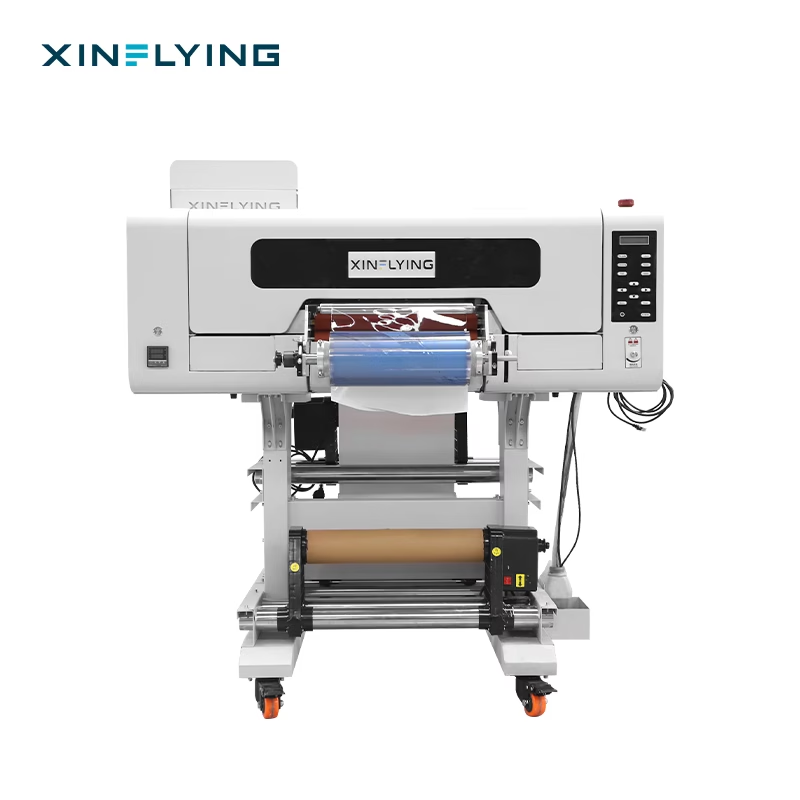
Xinflying’s XF-450S UV 3PC Epson Print Head UV DTF Printer has a listed printing width of 12 inches and machine dimensions of 1,300 × 1,000 × 1,450 mm. It uses three Epson i1600-U1 printheads. Although its integrated design combines printing and laminating, buyers should assess the complete installation footprint rather than relying on the word “compact” alone.
Streamlining Printing and Laminating
An effective production layout separates artwork preparation, printing, lamination, transfer cutting, application, and packaging into clear stages. Keeping these activities organized reduces unnecessary movement and helps prevent dust or handling damage from affecting finished transfers.
Integrated printing and laminating can simplify the workflow by reducing transfers between separate machines. The XF-450S combines these functions in one system designed for crystal label production. For studios producing decorative stickers and branded transfers, this arrangement may help coordinate production while using workspace more efficiently.
Batch planning offers another practical improvement. Operators can group compatible designs, prepare repeat-order files, and arrange artwork to use film efficiently. Running a test transfer before a large batch allows the team to check alignment, color, and lamination, reducing the risk of costly reprints.
Print quality influences customer satisfaction, especially for detailed logos, small lettering, gradients, and decorative textures. When evaluating equipment, businesses should request sample transfers featuring their typical artwork. Edge definition, color consistency, surface finish, and adhesion on representative products provide more useful evidence than promotional images alone.
The XF-450S uses three Epson i1600-U1 printheads to produce detailed UV transfers with vivid colors and raised textures. Its published printing speed is 2.75 m²/h in 8-pass mode. Buyers should interpret this figure according to the specified operating mode and confirm expected finished output under their own production conditions.
A reliable UV DTF printer manufacturer should provide clear specifications, operating guidance, and information about compatible consumables. Studios should also test transfers on their intended substrates before accepting bulk orders, since curing, adhesion, and durability can vary with the film, ink, surface coating, and application process.
Choosing Materials and Managing Maintenance
UV DTF transfers can support customization across compatible glass, metal, acrylic, and plastic products. This flexibility helps small studios serve different customer groups without requiring direct printing on every object. However, surface texture, curvature, cleanliness, and coatings affect application results. Testing actual products before production helps identify compatibility issues early.
Routine maintenance is equally important. Operators should follow the manufacturer’s instructions for printhead care, ink management, film-path inspection, and cleaning. Keeping consumables organized and recording maintenance activities can reduce avoidable interruptions. Businesses should also ask about training, warranty coverage, spare parts, and technical support before purchasing.
When comparing an A3 UV DTF printer, studios should consider the full cost of ownership, including ink, transfer film, maintenance supplies, labor, and potential downtime. A suitable machine is one that balances output quality, operating expenses, and practical capacity rather than simply offering the lowest purchase price.
Building a More Productive Compact Studio
Improving studio productivity requires coordinated decisions about equipment, workspace, batch planning, and maintenance. An A3 UV DTF printer can help businesses organize customized transfer production, provided its verified specifications and capabilities match their order volume and target applications.
Xinflying’s XF-450S combines three Epson printheads, a 12-inch printing width, and integrated printing and laminating. For studios and small-to-medium-sized enterprises, its published specifications provide a starting point for evaluating production needs. By testing representative materials, confirming operating requirements, and assessing supplier support, businesses can build a more consistent workflow and expand customization services without overlooking the practical limits of their workspace.